Up next in 10

[★★★★☆] Not Now Mom, I'm Reorganizing Wiki Icons From The Trash To Their Folders
Oct 11, 2026

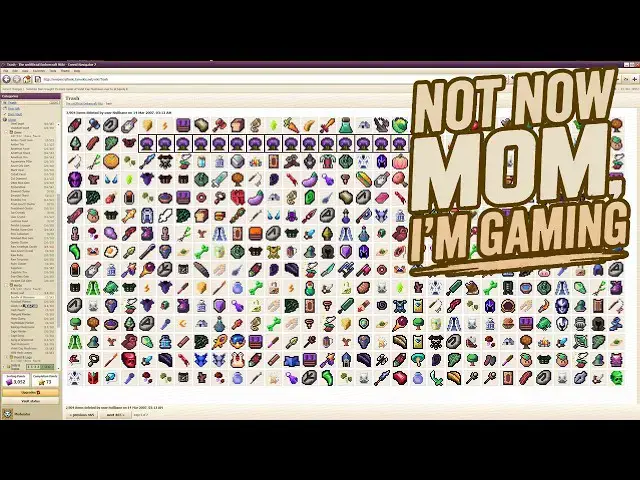
This is a gameplay review of Deleted Wiki: Clean Up the Lost Files.
╰┈➤ˎˊ˗ Check out our written reviews - https://tgexp.com/
╰┈➤ˎˊ˗ Join our Patreon! - https://www.patreon.com/worthyofme
╰┈➤ˎˊ˗ GoFundMe - https://www.gofundme.com/f/help-my-wishlist-addiction
━━━━━━ ⊙ ❖ ⊙ ━━━━━━
00:00 Intro
02:12 Icons
02:42 Options
03:24 Stats
05:14 Tooltips
05:44 Points
06:21 Storyline
07:17 Conversations
08:38 Similar icons
09:41 Icon reskins
10:55 Upgrades
12:32 Item vault
14:38 Multiple icons
15:53 Trashed viewpoint
17:44 Color scheme
━━━━━━ ⊙ ❖ ⊙ ━━━━━━
Feel free to contact us for podcast reviews - podcast (at) tgexp.com
⋆⁺₊⋆ ━━━━⊱༒︎ • ༒︎⊰━━━━ ⋆⁺₊⋆
✨ AFFILIATES ✨
SYNC - https://www.sync.com/?_sync_refer=a85470970
I store a lot of my videos on Sync and have used it for years.
BUNNY - https://tinyurl.com/bunnynetaff
I recently started using Bunny to store videos for my Patreon channel for the ad-free videos.
SMUGMUG - https://secure.smugmug.com/signup?Coupon=dTc34n
SmugMug is used to store all of my screenshots and images I use on my website, so I don't have to upload them to Wordpress and take up space.
TUBEBUDDY - https://www.tubebuddy.com/pricing?a=worthy
Because, y'know, everyone needs a little help with SEO and such when it comes to making a better YouTube channel.
Show More Show Less View Video Transcript
0:00
Hello everyone. My name is Kay and this
0:03
is a pros and cons of the game I'm
0:05
deleted Wiki clean up the lost files on
0:09
not now Mom. I'm gaming.
0:12
This is the exact game that I love.
0:18
You don't like walk around a store and
0:20
pick up things and put them on proper
0:22
shelves, which I like those games too.
0:24
Don't get me wrong, but this one you
0:26
just move
0:29
icons into the proper folders and I
0:33
am pretty OCD.
0:35
Or at least my brain wants to be OCD
0:38
when it comes to organizing things. So I
0:41
have a lot of folders going on.
0:44
But first before we get into this game,
0:46
have you guys
0:48
ever had
0:50
Cold Stone Creamery's little
0:54
ice cream cupcakes? Oh my God, they're
0:56
so good.
0:58
There's like three different flavors of
1:00
them that comes in
1:02
container. Oh my gosh, I love them.
1:06
My mom wanted icy from sheets and I was
1:09
like, no.
1:10
I'll Door Dash Cold Stone and so we all
1:13
enjoyed our cupcakes.
1:15
And she said it was much better
1:17
than an icy or slushy from sheets. So I
1:20
was like, yeah, I know.
1:23
I haven't had Cold Stone in so long. I
1:27
love their ice cream.
1:29
Anyway, getting back to the game.
1:32
So with the start, there's three
1:34
different save slots. You are a
1:36
moderator and as a moderator of a Wiki,
1:39
you get to choose your icon as well as
1:41
the the color of the background and
1:45
maybe even the design of the background
1:47
if you would like.
1:50
Which is kind of fun to tinker with.
1:53
And then you kind of get to the main
1:55
menu portion.
1:57
So there's a play, a locked, and the
1:58
challenges.
2:00
As well as on the right, there's an
2:01
options, controls, and about.
2:04
As far as the option goes, there's a
2:07
display section for full screen or
2:11
whatnot, display size, icon size, if you
2:14
need them to be a little bit bigger,
2:16
or if you're good with going really tiny
2:19
to make a whole bunch of them appear on
2:21
one page.
2:22
You can reduce the motion.
2:25
And
2:27
menu backgrounds, restored items,
2:30
drifting behind this menu. I
2:32
I don't know about that one, but I
2:33
haven't checked, so.
2:36
For audio, you can adjust the volume or
2:39
the music or just mute everything.
2:43
Maybe mute the music. I don't understand
2:45
that, actually.
2:47
Cuz if you can use move the slider to
2:49
0%, then you're automatically muting it,
2:52
right?
2:53
Unless mute mute sound effects as well,
2:56
which doesn't have an audio bar. I don't
2:57
know.
2:59
The for fun section has caps lock
3:02
incident.
3:03
Everything is now extremely important.
3:07
Arvid pilot, oops, all frogs.
3:11
Huge wiki.
3:13
I I don't know.
3:16
They're for fun.
3:17
Uh apparently, I didn't want anything to
3:19
do with fun, so I didn't
3:22
do anything with those.
3:25
Before you click new game, you can see
3:27
that you can see the amount items that
3:29
were shelved, departments restored, and
3:32
it's banked restoration, and last played
3:35
for when you start the game up and then
3:38
exit and come back into it.
3:40
All your data is kind of right there for
3:42
you to look at.
3:44
And here it all is, folks.
3:46
Here's what you have to look forward to
3:49
in playing this game.
3:52
I want to my icons are pretty small.
3:56
I don't know if they're the smallest
3:57
they can be, but they're certainly not
3:59
the largest they can be.
4:02
I kind of like them this size. There's
4:05
There's a lot of them on each page.
4:08
And I kind of prefer that. I don't want
4:09
to like
4:10
50 pages to go through just cuz they're
4:13
larger icons.
4:15
But I love dragging icons into the
4:18
appropriate
4:20
folders.
4:21
It's very relaxing to me. It's
4:24
time-consuming.
4:26
I'm in no rush.
4:28
Dare I say it's cozy?
4:30
I don't know. It's
4:34
I wouldn't say it's cozy personally.
4:38
I don't know what people really
4:41
relate to as cozy. Maybe farming
4:43
simulators, they can be cozy, but
4:46
I feel like cozy
4:48
is the same as casual.
4:51
Maybe cozy is the same as relaxing. I
4:53
wouldn't say this is relaxing cuz it
4:55
does get stressful at some points.
4:59
And as you put items into the main
5:01
folder, when you go into that main
5:02
folder, such as the category for
5:04
weapons,
5:05
everything that you placed in there is
5:07
up at the top, and then there is
5:08
subfolders down there, which you can
5:11
drop these into the appropriate
5:13
subfolders. What I really like about
5:16
this game is when you hover over
5:17
something, a tooltip will come up.
5:21
And it will say where it belongs. So,
5:23
the rose thorn throwing knife would be
5:26
weapons, daggers, and then in the
5:30
sub-sub folder, rose thorn throwing
5:33
knife. So,
5:35
each item has its own folder for it.
5:39
We're getting very specific
5:42
in our categorizing.
5:44
When you put an item into its correct
5:46
sub folder, you get sorting points.
5:50
And with a certain amount of sorting
5:52
points, you can get upgrades. Same with
5:55
completion points. Completion points
5:57
only occur when you actually complete
6:01
a sub sub folder, like the item name
6:04
folder.
6:06
As you progress through the game, you
6:08
will get notifications at the top of
6:10
your page, such as you get new messages
6:12
on your talk page, and you can go into
6:14
them by clicking the link
6:18
user talk moderator, and you can go
6:20
through these.
6:21
There is an actual storyline to this
6:24
game.
6:26
So, some random person didn't just go
6:29
here and be like, "I want to wreck
6:30
everybody's lives." and
6:33
completely deface this game by throwing
6:35
everything into the trash.
6:37
I feel like if they really really hated
6:42
this Wikipedia, then they would have
6:45
removed everything from trash after
6:47
throwing it away.
6:49
Unless they were caught at the point
6:51
where they threw it all away, and they
6:53
weren't able
6:55
to completely destroy everything in the
6:56
trash. That's the only thing I can think
6:58
of that would stop them.
7:01
Or maybe they had
7:04
They didn't want to take it too far.
7:08
I don't know though. They were
7:10
pretty annoyed when they did this,
7:12
clearly.
7:14
But yeah.
7:15
There's a forum
7:18
that will have pop-ups for you to look
7:20
at, and you can't actually go into the
7:22
forum to look at what they're talking
7:24
about.
7:26
That's mainly just for the user talk
7:29
section,
7:30
where you actually get to see what
7:31
everybody is writing about.
7:34
But the forums
7:37
mainly just have a title,
7:40
and then maybe a screenshot that you can
7:43
look at.
7:45
But I like the fact that you can kind of
7:47
read all this. It makes it seem like
7:49
there are actual people over here and
7:51
they're having conversations and you
7:54
have spam as well.
7:57
It's not just a game where you're just
8:01
chosen as a moderator to
8:04
put everything back in its place.
8:07
It does give you a little breaks from
8:09
doing that if you want to take little
8:11
breaks
8:13
and check out what everybody is talking
8:14
about lately.
8:16
We're at the very start of the game
8:18
here, but this is something that I want
8:19
to point out since I just noticed this
8:21
little tools up here.
8:23
Scarlet quill feather, it's actually a
8:25
curios and belongs in the office and
8:27
life
8:28
subfolder.
8:31
I don't like the fact
8:33
there's two things that are kind of
8:36
combined that I don't like within this
8:38
game. And that's the fact that icons
8:40
look too similar to other things such as
8:44
scarlet quill feather. It looks like a
8:46
sword.
8:47
So you
8:49
as you go through the game, you can
8:52
mass click on things so you can move
8:55
multiple amounts into a folder.
8:58
And if you see this, you're going to
9:00
automatically assume it's a sword and
9:02
put it into the sword section.
9:04
And even
9:06
if you notice that it's not a sword as
9:08
you
9:11
kind of try to find all the items for
9:14
folders,
9:15
you're going to probably forget that
9:17
this is a curios
9:21
and you're going to think it's a sword
9:22
so you're not going to hover your mouse
9:24
over it to look at the tool tip cuz why
9:27
would you if it looks like a sword but
9:28
it's actually a curios.
9:31
Which is a lot of times
9:34
skulls and masks
9:37
and stuff like that.
9:39
Like unique items.
9:42
Another thing that I don't like that
9:45
kind of fits into this
9:47
is there seems to be
9:49
icons that are
9:51
what would you call it? Reskins?
9:54
Like with the replica mace.
9:57
It's a mace.
9:59
It's a weapon.
10:01
It looks like
10:02
every other mace.
10:05
Or at least the reskinned versions of
10:07
this mace. However, it does not go into
10:09
weapons. It goes into curios.
10:13
Which is incredibly frustrating.
10:15
Because when it came to me finding all
10:17
the curios
10:19
I kept skimming over this thing cuz it's
10:21
a weapon.
10:23
It's not a curious.
10:25
So I hate the fact that they did that. I
10:27
think it they maybe they thought it
10:29
would be fun to be kind of sneaky, but
10:32
it was
10:33
incredibly annoying.
10:37
Especially when you have a whole
10:39
subfolder
10:41
not knowing
10:44
what the heck any of them look like.
10:47
Don't don't do that, developers.
10:51
You're not being cute.
10:53
You're being obnoxious.
10:56
When it comes to your upgrades
10:59
certain
11:00
upgrades will require either sorting
11:02
points or completion points.
11:05
The completion points are actually the
11:08
upgrades that are on the bottom. I was
11:09
thinking that they weren't
11:12
separated, but yeah, they are.
11:14
And the sorting points are
11:17
the above sections.
11:19
And it tells you how many you need
11:23
how many more you need
11:25
in order to
11:27
get the upgrade available.
11:29
They're all pretty good upgrades in my
11:31
opinion.
11:34
Specifically the quick access
11:37
and the multi select
11:39
as well as the folder sort
11:41
and auto restore
11:43
and summon items. Though a lot of them
11:45
are really good.
11:47
The one thing I never used was the find
11:49
and page
11:51
which adds a search bar and you can
11:55
type in the item name
11:57
and I suppose
11:59
that would have
12:00
helped.
12:03
This game for being what it is is it's
12:04
pretty vast as far as the menu goes.
12:09
I didn't really want to mess too much
12:11
with the file edit view favorites whole
12:13
theme help and the icons on the other
12:16
side.
12:18
So I kind of just stuck to the
12:21
main bulk of the screen.
12:23
But I mean, yeah. Every upgrade is
12:26
pretty darn good as long as you
12:28
implement it
12:30
to the best of your ability.
12:33
The item vault is where you can go into
12:36
to look at all the items that you need
12:38
to acquire to finish up the different
12:41
folders and sub folders and stuff like
12:43
that.
12:44
>> [snorts]
12:44
>> So if you don't have
12:46
the items
12:48
then it will be a gray scale
12:51
icon.
12:53
So if you're missing something in an
12:55
area, then you can come to the item
12:57
vault and kind of get a feel for what
12:59
you need.
13:02
There was one thing in the curios that I
13:04
could not figure out for the life of me
13:06
based on the gray scale icon, so
13:09
it took me a really long time to finish
13:11
that folder up.
13:13
I think I was trying to get through it
13:14
first
13:16
of all things.
13:18
But yeah, well it won't show you the
13:19
distinct colorations
13:21
of what the icon looks like, it does
13:23
give you a vague impression of it
13:24
through a gray scale.
13:27
Which could help you finish up the
13:28
folder.
13:30
There comes a point in the upgrades
13:32
where you can expand the sub folders
13:34
fully, so you get the folder the main
13:36
folder up top, the sub folder below
13:38
that, and then
13:40
the sub folder inside of that, which is
13:42
the item name.
13:43
And once you can expand those, you can
13:46
simply
13:47
click on all the same icons,
13:50
and then move it directly into the
13:52
folder that they need to go in to finish
13:55
it.
13:56
Which is very handy.
13:59
Instead of just
14:01
pulling them into the top sub folder.
14:04
Another con that I can think of off the
14:06
top of my head, it's been like
14:09
a couple weeks since I played this game.
14:11
My bad.
14:13
I'm really bad at like finishing a game
14:15
and then not reviewing it for a while
14:18
cuz I jump into other games, but anyway.
14:22
So, with one of these upgrades you get,
14:26
you can click on a multiple
14:28
icons at once.
14:31
And as I was going through the pages and
14:33
clicking on
14:35
a specific set of icons,
14:38
if you click off of an icon
14:41
accidentally, [clears throat] like you
14:43
aim to click it but you miss
14:46
the icon itself,
14:48
it all resets.
14:49
So, you no longer
14:51
have any of the icons you had
14:54
highlighted before.
14:56
And you have to go back through the
14:58
pages to find them again and to click
15:01
them again and to hope that you don't
15:03
miss click again.
15:05
And I I think I only did this maybe four
15:09
times and each time I did it I got so
15:12
irate.
15:14
I was it's just so annoying, you know,
15:17
when
15:18
you're not using a specific skill to
15:20
bring all of the icons toward you
15:23
or to
15:24
use a skill to point out where the icons
15:26
are. Like, move on to the next one, move
15:28
on to the next one. If you're going
15:30
through them page by page and
15:32
specifically looking for the icon itself
15:35
on your own time without using any kind
15:37
of skills, it's so annoying to
15:40
accidentally click off one of them and
15:43
then just reset the entire
15:45
like thing that you just did.
15:49
That's like
15:51
the number one rated con.
15:54
Once you are done with the game, you're
15:56
not actually done with the game. There
15:58
is kind of like a part two to the game
16:01
where the main menu changes
16:05
and then you become
16:07
I don't want to say hacker, but maybe
16:11
you become the person that deletes
16:13
everything.
16:15
And this is called Null Bane that you'll
16:17
be starting into.
16:20
Instead of sorting points and completion
16:22
points, we have deletion points. So, as
16:26
you delete items, you can do upgrades
16:29
that will help you delete more at a
16:31
time.
16:33
And as you do, the user talk section
16:35
also has different changes to it.
16:38
There's different conversations going on
16:39
than before, of course.
16:43
At the end of everything, there's a
16:44
whole storyline where you go back and
16:48
just
16:50
talk about what happened and you
16:52
understand why this whole thing
16:55
occurred.
16:56
I really, really like what they did with
16:59
the storyline, too.
17:02
All in all, not a five-star rated game,
17:06
but definitely four stars. It's just
17:09
those little things
17:11
that annoyed me.
17:14
It just dropped off a star.
17:16
But still, it is a really good game for
17:19
what it is.
17:21
Very,
17:22
I suppose, relaxing.
17:24
I can see that, right? Even when you get
17:26
annoyed, it's still kind of relaxing.
17:29
Especially if you're not pushing
17:31
yourself to do it too quickly, and you
17:33
actually take the time to read the tool
17:35
tips if you're unsure what something is.
17:39
But, again, those stupid icons, they
17:42
look like other things.
17:45
A couple other things that I missed out
17:46
on talking about.
17:48
One of them
17:49
is the famous oven the toolbar.
17:52
You can change the look
17:55
of the overall layout. So, if you don't
17:57
like the white screen and the light blue
18:00
bar colorations, there are a variety of
18:03
different themes that you can choose
18:04
from. Uh some of them might benefit you
18:07
better, let you be able to see better,
18:09
and stuff like that.
18:12
Also, at the title screen, there are
18:14
challenges. Now, I did do these
18:16
challenges. I don't have a screenshot of
18:19
going into them. I think there are three
18:21
of them. I couldn't tell you what they
18:23
all are at the top of my head.
18:26
I believe one is to
18:29
do a single
18:31
main folder as fast as you can
18:34
with all upgrades given to you at the
18:37
start.
18:38
And, there are two other challenges, but
18:41
I can't really recall what they are at
18:43
the top of my head. Sorry.
18:46
I believe the timed one does offer a
18:47
leaderboard, however.
18:50
So, you can see what
18:52
rank you place,
18:54
even if you aren't in the top certain
18:56
number of them.
18:58
I believe that was in the latest update.
19:01
And, they made some changes since I
19:03
first played this game.
19:05
But, yeah, those those were the main two
19:07
things that I skipped out on. I totally
19:09
forgot to talk about. This is what
19:11
happens when I don't write down a
19:12
script.
Games